Instagram image metadata & privacy
Photos often carry EXIF, GPS, and software tags from cameras or AI generators. Before you post, reviewing metadata is a privacy step — not a way to change how Instagram labels AI content.

清除照片中的 AI 与隐私元数据
文件不会离开你的设备。 支持 JPEG、PNG、WebP、AVIF、HEIC、相机 RAW · 免费批量最多 20 个并打包 ZIP。RAW 在本地经 libraw 解码为干净 JPEG(≤80 MB)。
或拖放到此处
HEIC / AVIF / 相机 RAW 在本地解码并导出为干净 JPEG。RAW 使用浏览器内 libraw-wasm(剥离容器元数据;不重写专有 RAW 字节)。
默认开启指纹防护:清洗后的图片会加入轻微像素级噪声(感知哈希会变化,通常肉眼不可见)。取消勾选或选择「保留原始像素 / 画质」可在可能时仅剥离元数据。
What
What this does
Understand what may hitchhike on a JPEG or PNG before an Instagram upload, then clean locally so you control the baseline — platforms may still recompress or use non-metadata signals.
- GPS coordinates and capture time
- Camera model, lens, and editing software
- AI generator parameters (text / XMP)
- C2PA content credential containers when present

Why
Why clean metadata locally

Strip container tags without uploading
This AI metadata cleaner runs in your browser so you can strip container tags and remove EXIF without sending originals to a third-party server. An on-device AI metadata cleaner keeps client catalogs private.
AI metadata cleaner + provenance container in one pass
Use one AI metadata cleaner to remove EXIF camera tags, GPS, XMP/IPTC, and provenance container / C2PA containers from the file you hold — still honest about SynthID limits.
Batch when you need to strip container tags at scale
Photographers and sellers use this AI metadata cleaner to strip container tags across sets, then download a ZIP. Free batch limits apply; no account wall to start.
Fingerprint protection while you remove EXIF
Default image cleaning adds light pixel noise after you remove EXIF / strip container tags, shifting perceptual hashes. Turn it off when you only need a container-only strip.
How
How it works
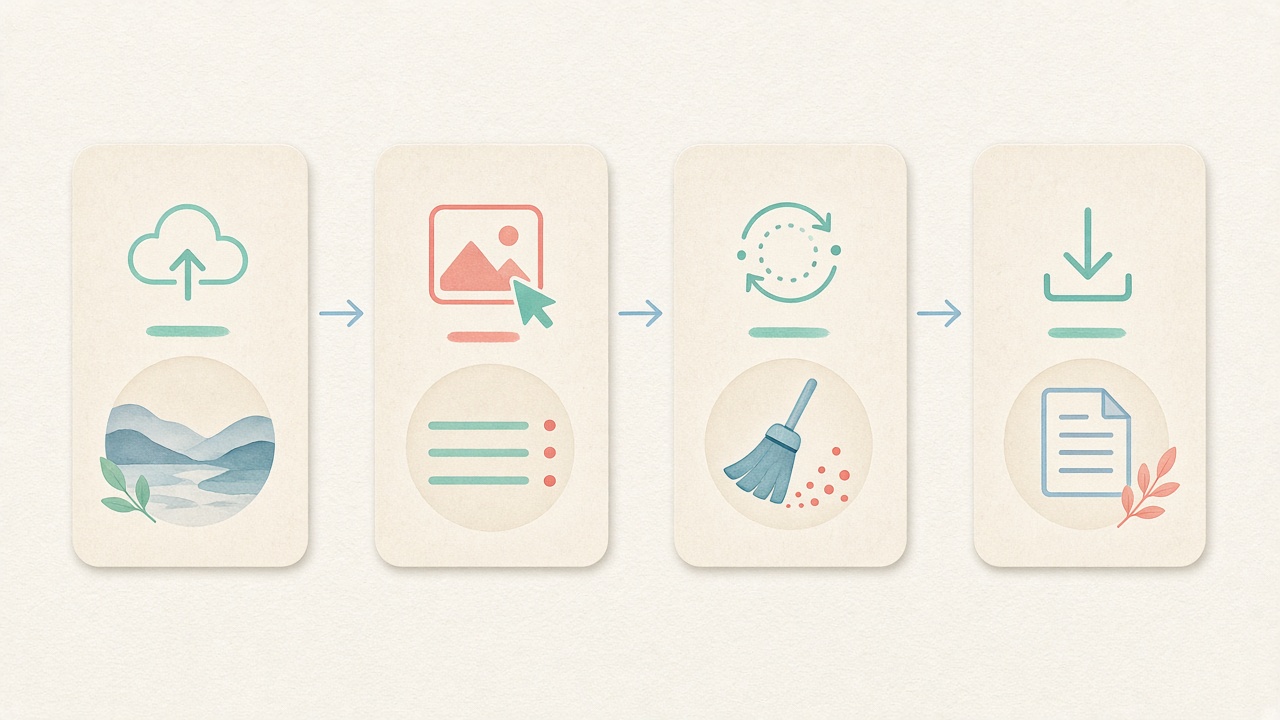
- Step 1
Open the AI metadata cleaner
Stay on this page and use the workspace below. The AI metadata cleaner is ready to strip container tags with no signup.
- Step 2
Choose Images, Video, or PDF
Pick the tab that matches your files. The same AI metadata cleaner can remove EXIF on photos, strip video containers, or clear PDF Info fields.
- Step 3
Drop files and review tags
Drag files in to detect fields locally. Confirm GPS, EXIF, or provenance container markers before you strip container tags.
- Step 4
Clean to remove EXIF / strip container tags
Run clean to remove EXIF and related tags with this AI metadata cleaner, then download files or a ZIP. Fingerprint protection stays on unless you disable it.
Use cases
Who it’s for

AI image publishers
When you need to strip provenance container containers (not SynthID pixels), this AI metadata cleaner can strip container tags markers locally. Pair Detect mode with the AI metadata cleaner path before you publish.
Details
More context
What platforms often change
Many social apps recompress uploads and drop some EXIF fields. That is not reliable privacy control: behavior changes over time, and other signals may still exist. Cleaning locally before upload gives you a predictable baseline.
Reminder
Metadata cleaning does not remove SynthID-style pixel watermarks and does not guarantee labeling outcomes. Platform policies change; verify current Instagram help docs for account-level settings before you post.
Related
Related guides & tools
- Clean metadata
Strip EXIF, GPS, C2PA containers locally.
- Detect markers
Inspect EXIF, GPS, and C2PA containers on-device.
- What is C2PA?
Content Credentials containers explained honestly.
- What is SynthID?
Why metadata tools cannot remove pixel watermarks.
- Meta AI labels
Metadata vs platform labeling.
- Etsy listing photos
Seller privacy checklist.
Clean metadata locally
Strip EXIF, GPS, XMP, IPTC, and C2PA/JUMBF containers in your browser — free, no account.
FAQ
FAQ
- What is this AI metadata cleaner and how does it work locally?
- This AI metadata cleaner is a free, browser-based privacy workspace that strips container headers from images, camera RAW files, videos, and PDF documents directly on your device. Instead of uploading your personal or commercial assets to a remote cloud server, our AI metadata cleaner runs HTML5 Canvas, libraw-wasm, ffmpeg.wasm, and pdf-lib inside local browser memory. You can inspect or strip EXIF camera blocks, GPS coordinates, XMP sidecars, IPTC press records, and C2PA JUMBF superboxes with this AI metadata cleaner in seconds.
- How do I strip photo headers using this AI metadata cleaner?
- Scroll to the embedded AI metadata cleaner workspace at the top of this page, keep the Images tab selected, and drop up to twenty JPEG, PNG, WebP, AVIF, HEIC, or RAW files into the queue. Our AI metadata cleaner parses the binary file structure on-device and rebuilds a clean derivative free of IFD0, ExifIFD, GPSInfo, MakerNote, XMP, IPTC, and C2PA blocks. Once the AI metadata cleaner finishes, you can save individual photos or grab a single bundled ZIP archive.
- Does this AI metadata cleaner also work as a camera EXIF and GPS stripper?
- Yes, every pass through our AI metadata cleaner removes standard camera EXIF tags—including body serial numbers, lens models, shutter timestamps, and embedded preview thumbnails—alongside GPS latitude, longitude, altitude, and compass bearing. Photographers and e-commerce sellers rely on this AI metadata cleaner so home studio coordinates never travel inside published product listings. You get complete camera and generative container hygiene from one unified AI metadata cleaner.
- Can I use the AI metadata cleaner without registering an account or paying?
- Yes, the entire AI metadata cleaner workspace is free to use in your browser with no account signup, email wall, watermark, or subscription gate. Your source files stay inside local device RAM while the AI metadata cleaner processes up to 20 images, 3 video clips (up to 100 MB each), or 10 PDF documents per batch. If you have larger studio folders, simply run additional batches in the AI metadata cleaner back to back.
- Which C2PA and generator tags does the AI metadata cleaner remove?
- Our AI metadata cleaner strips JPEG APP11 JUMBF superboxes, PNG caBX/jumb chunks, PNG tEXt/iTXt prompt parameters, WebP XMP/EXIF payloads, and MP4/MOV moov/udta and uuid provenance boxes. However, we keep our AI metadata cleaner boundaries 100% honest: container stripping cannot remove imperceptible pixel or audio watermarks like Google SynthID, nor does this AI metadata cleaner guarantee how third-party social platforms classify or label uploaded media.
- Why choose a local browser AI metadata cleaner over cloud upload websites?
- Cloud strippers require you to transmit unreleased client campaigns, private family albums, or heavy video cuts to someone else's server before returning a file. Running our AI metadata cleaner locally means your originals never cross the network and heavy WebAssembly engines cache once in your browser for instant repeat sessions. Studio teams trust this on-device AI metadata cleaner to protect both confidential creative assets and proprietary prompt workflows.
- How does fingerprint protection work inside the AI metadata cleaner?
- When you clean images in our AI metadata cleaner, an optional fingerprint-protection toggle is enabled by default to add an imperceptible pixel-level noise layer during canvas export. That subtle perturbation shifts both cryptographic file hashes (MD5/SHA-256) and basic perceptual hashes (pHash/dHash/aHash) while the AI metadata cleaner strips all outer container tags. If your workflow requires strict pixel fidelity, simply uncheck the toggle before running the AI metadata cleaner.
- Which image, RAW, video, and document formats does the AI metadata cleaner support?
- In the Images tab, the AI metadata cleaner handles JPEG, PNG, WebP, AVIF, and HEIC files plus Camera RAW formats (DNG, CR2, NEF, ARW up to 80 MB) decoded locally to clean JPEGs. In the Video and PDF tabs, the same AI metadata cleaner remuxes MP4, MOV, and WebM clips (up to 100 MB each) via lossless ffmpeg.wasm stream copy and clears PDF /Info dictionary fields. You can also switch to Detect mode at any time to verify your files after running the AI metadata cleaner.
Educational privacy guidance only. We do not remove SynthID or invisible pixel watermarks, do not validate Content Credentials cryptographically, and do not guarantee platform labeling outcomes. No bypass-detection advice.