Read-only local inspector · exif metadata viewer
EXIF Metadata Viewer — inspect hidden file headers locally in read-only mode
Looking for a fast, private exif metadata viewer before publishing visuals, verifying deliverables, or auditing shared files? Media saved across JPEG, PNG, WebP, AVIF, HEIC, Camera RAW (CR2/CR3/NEF/ARW/DNG), MP4, MOV, WebM, and PDF files frequently carries unseen binary headers, creation logs, software strings, or coordinate directories inside the container wrapper. Our browser-based exif metadata viewer opens directly in read-only inspection mode (`mode="detect"`) and parses every tag on your device without uploading a single byte to any remote server. Drop up to twenty files into the queue below to run the exif metadata viewer instantly, review highlighted risk badges at the top of the table, and switch to Clean mode in one click whenever you want to strip them.
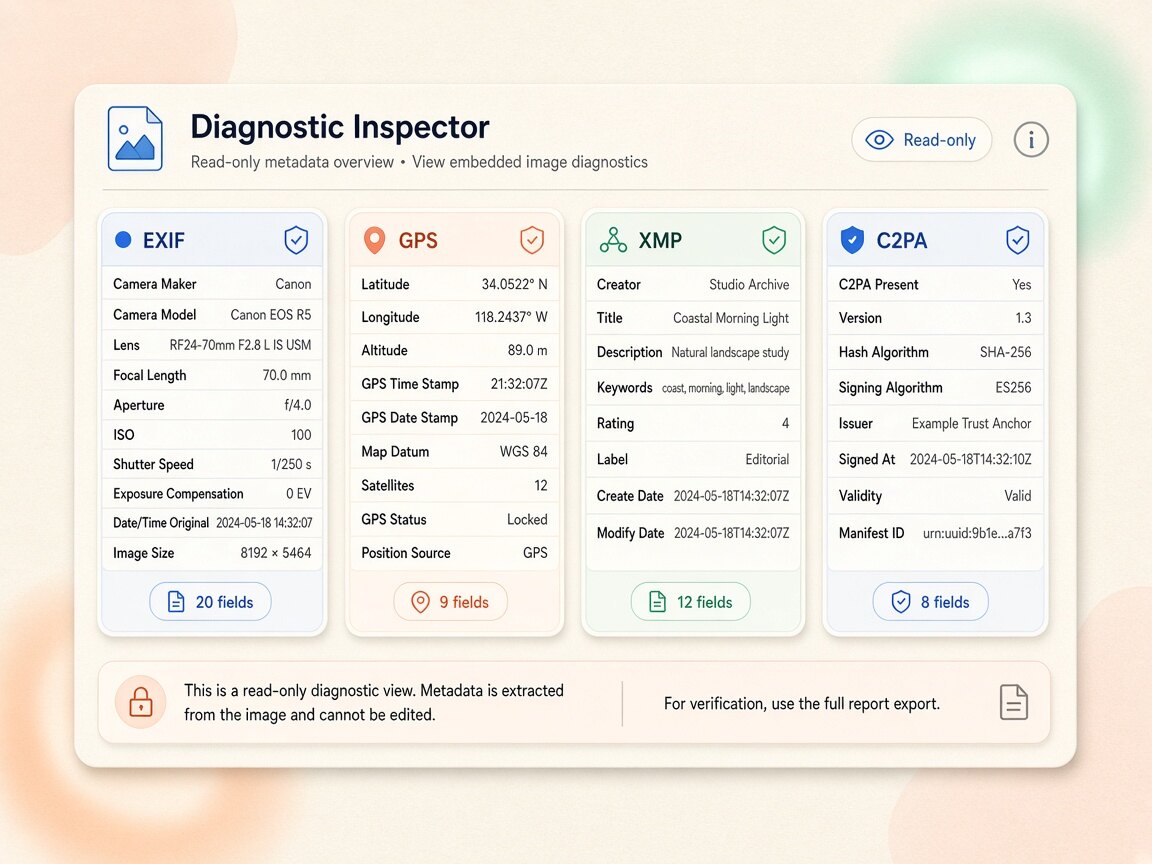
Detect image metadata in your browser
Files never leave your device. JPEG, PNG, WebP, AVIF, HEIC, Camera RAW · free batch up to 20 + ZIP. RAW decodes locally via libraw → clean JPEG (≤80 MB).
or drag and drop here
HEIC / AVIF / Camera RAW decode locally and export as clean JPEG. RAW uses libraw-wasm in your browser (drops container metadata; does not rewrite proprietary RAW bytes).
What
What our exif metadata viewer reveals inside your files
When you run the exif metadata viewer through this read-only browser utility, the parser scans binary segments across JPEG, PNG, WebP, AVIF, HEIC, Camera RAW (CR2/CR3/NEF/ARW/DNG), MP4, MOV, WebM, and PDF files. Specifically, our inspection engine extracts TIFF `IFD0` and `ExifIFD` exposure tables (shutter speed, aperture, ISO, focal length, lens serials), `GPSInfo` latitude/longitude/altitude coordinates, vendor `MakerNote` blocks, `IPTC` press records, `XMP` edit histories, PNG `tEXt`/`iTXt` prompts, and C2PA JUMBF containers. Photographers, researchers, and studio teams rely on a dedicated exif metadata viewer to verify exactly what hidden information is attached to a file without altering a single byte on disk. Because every scan in the exif metadata viewer executes inside local browser memory, sensitive photos and unreleased renders never touch an external cloud API.
- Inspect binary headers in read-only mode with the exif metadata viewer and zero server uploads
- Surface highlighted summary counts at the top of the exif metadata viewer inspection table
- Read camera parameters, software identifiers, and XMP packets via our exif metadata viewer
- Audit up to 20 files simultaneously in the exif metadata viewer queue without modifying originals
- Switch from the read-only exif metadata viewer to local Clean mode in one click when needed
- Honest boundaries: this exif metadata viewer reads container headers locally; it does not decode SynthID
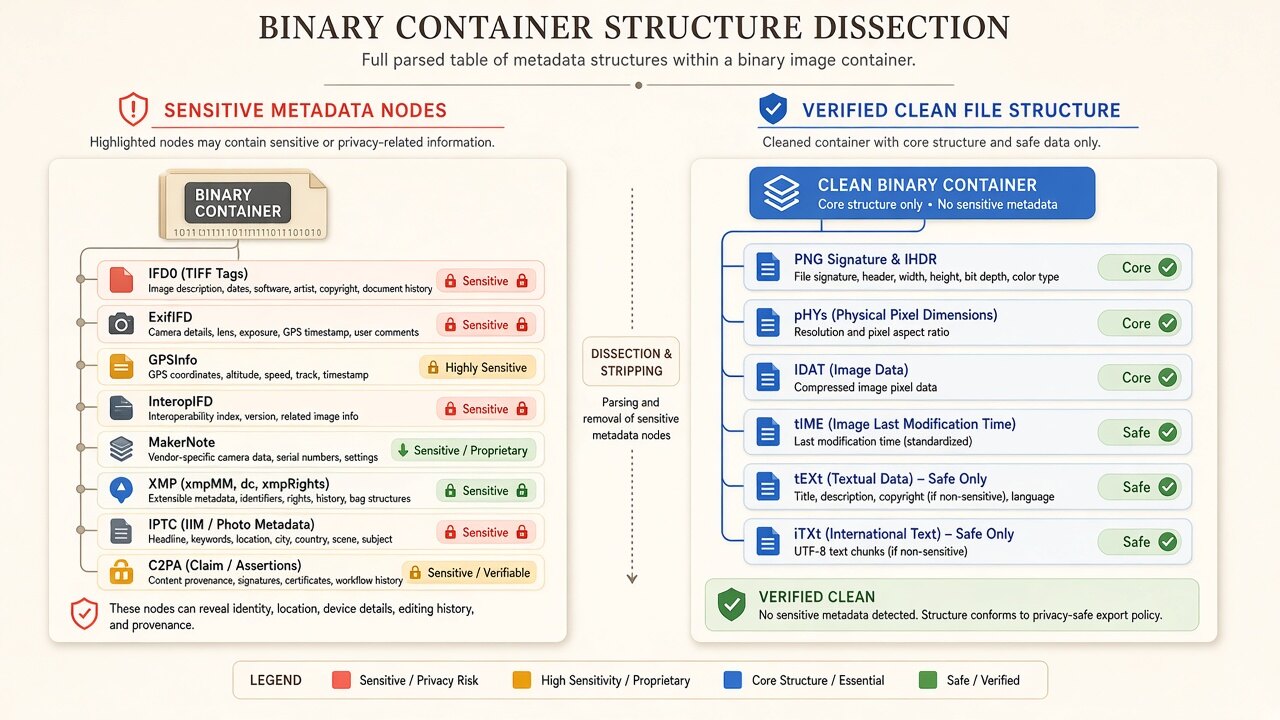
Binary header parsing architecture
How our exif metadata viewer reads container blocks in browser memory
Most web-based inspectors upload your private photographs to a remote PHP or Python server just to run ExifTool and return a table. Our read-only workspace opens directly in `mode="detect"` and parses binary headers (`APP1`, `APP11`, `APP13`, `eXIf`, `tEXt`, `iTXt`, RIFF `EXIF`/`XMP `, and ISOBMFF `meta` boxes) 100% inside local browser memory. Sensitive categories such as `GPS`, `C2PA`, and `AI tags` are flagged at the top of the table so you can audit privacy risks first and switch to Clean mode in one click if needed. When you drop files into the exif metadata viewer queue, our client-side parser walks the container tree and formats every discovered key-value pair into an easy-to-read diagnostic table. Using the exif metadata viewer locally lets you verify whether a file carries hidden coordinates, workflow prompts, or provenance manifests before deciding how to share it.
- Parse binary application markers and ancillary chunks inside the exif metadata viewer
- Highlight sensitive privacy and provenance categories at the top of the exif metadata viewer
- Inspect raw key-value strings without altering file timestamps in the exif metadata viewer
- Transition seamlessly from the exif metadata viewer audit view to local batch sanitization
Privacy auditing & verification workflow
When to run the exif metadata viewer before and after file sanitization
Security-conscious creators, journalists, and QA engineers use a two-step audit workflow: first, drop incoming assets into the read-only exif metadata viewer to see what hidden tags exist; second, after stripping tags for public distribution, drop the exported derivatives back into the exif metadata viewer to verify that all sensitive containers now read zero. Because our exif metadata viewer runs entirely in your browser tab, you can audit confidential files offline or on restricted studio networks.
- Audit incoming client or contributor files with the exif metadata viewer before ingestion
- Review embedded prompts, seeds, and generator strings inside the exif metadata viewer
- Confirm post-clean container hygiene by re-scanning exports in the exif metadata viewer
- Run the exif metadata viewer on desktop or mobile browsers with zero extensions or logins
Why
Why use a local exif metadata viewer instead of cloud uploaders

Zero server uploads in exif metadata viewer
Online viewer sites upload your private photos to a remote server just to read their headers. Our exif metadata viewer parses every byte inside local browser RAM so your files never leave your device.
Read-only safety with exif metadata viewer
Opening a file in the exif metadata viewer (`mode="detect"`) is strictly non-destructive: it inspects and displays embedded fields without modifying your file.
Honest technical scope on exif metadata viewer
We clearly state what container inspection can and cannot do: the exif metadata viewer reads header segments and boxes locally, while never claiming to detect SynthID pixel watermarks or verify cryptographic trust chains.
One-click Clean from exif metadata viewer
Spot unwanted tags during your exif metadata viewer audit? Switch straight to Clean mode on the same page to strip them locally and export a ZIP.
How
How to use this exif metadata viewer in four steps

- Step 1
Open the read-only exif metadata viewer
Stay right on this page—the embedded exif metadata viewer workspace below is already set to read-only Detect mode (`mode="detect"`) with no login required.
- Step 2
Drop files into the exif metadata viewer
Drag up to twenty files into the exif metadata viewer queue; the browser immediately parses binary headers in local memory without uploading anything.
- Step 3
Review the exif metadata viewer summary table
Check the highlighted category badges at the top of the exif metadata viewer output and expand individual files to read every extracted key and value.
- Step 4
Clean or exit from the exif metadata viewer
Keep your audited files as-is after reviewing the exif metadata viewer report, or switch to Clean mode in one click to strip all detected container tags locally.
Use cases
Who relies on our exif metadata viewer workflow

Privacy-conscious photographers & families
Before posting personal photos online, users run the exif metadata viewer to check whether smartphone cameras embedded home coordinates or device serials.

Prompt engineers & technical artists
Creators drop saved renders into the exif metadata viewer to recover forgotten positive prompts, seed numbers, sampler settings, and ComfyUI JSON workflows.

Editorial desks & digital publishers
Editors inspect incoming visual submissions with the exif metadata viewer to check for container provenance boxes, software tags, and IPTC attribution fields.

E-commerce & brand QA teams
QA specialists verify that exported storefront graphics pass a clean exif metadata viewer check before pushing product pages to production.

Security researchers & OSINT analysts
Analysts use the local exif metadata viewer to inspect document, video, and image headers inside a sandboxed browser tab without leaking files to third-party APIs.

Everyday mobile & desktop users
Anyone curious about what hidden data sits inside a downloaded file can run the exif metadata viewer in seconds on phone or laptop with zero software setup.
Voices
What people say
Illustrative examples for layout — not verified customer reviews. No star ratings.

Maya R.
Product photographer
“I needed GPS gone before client galleries. Local batch + ZIP is exactly what I wanted.”

Jordan K.
Etsy seller
“Phone photos had home coordinates. Cleaning in the browser means I never upload originals to a random site.”

Alex T.
Social designer
“Clear about C2PA containers vs SynthID. I use Detect first, then Clean — no surprise claims.”

Sam L.
Freelance editor
“Fingerprint protection on by default is nice for reverse-image risk; I turn it off when pixels must stay exact.”

Riley P.
Content creator
“Video and PDF in the same local tool means I am not juggling three upload sites for one launch.”

Casey M.
Marketplace ops
“Batch-cleaning GPS before listing photos is now a fixed checklist step. Free limits cover our small team.”
Related
Related guides & tools
- Open inspector
Jump to the embedded read-only exif metadata viewer workspace to inspect files locally.
- Clean metadata
Strip EXIF, GPS, C2PA containers locally.
- Detect markers
Inspect EXIF, GPS, and C2PA containers on-device.
- What is C2PA?
Content Credentials containers explained honestly.
- What is SynthID?
Why metadata tools cannot remove pixel watermarks.
- Instagram metadata
Privacy before you post.
Ready to run the read-only exif metadata viewer in your browser?
Use the embedded Detect workspace above to inspect up to 20 files at once with our exif metadata viewer — 100% local, read-only, zero server uploads, with one-click switching to Clean mode.
FAQ
Frequently Asked Questions About EXIF Metadata Viewer
- Does this exif metadata viewer upload my files to a remote server to read the tags?
- No, every scan inside our exif metadata viewer runs 100% locally in your web browser after the page loads. The binary parser reads file headers directly from your device's memory without sending a single byte over the network. This makes the exif metadata viewer completely safe for auditing private family photos, confidential documents, and unreleased studio renders.
- Which specific binary containers and fields can the exif metadata viewer detect?
- Our exif metadata viewer inspects TIFF `IFD0` and `ExifIFD` exposure tables (shutter speed, aperture, ISO, focal length, lens serials), `GPSInfo` latitude/longitude/altitude coordinates, vendor `MakerNote` blocks, `IPTC` press records, `XMP` edit histories, PNG `tEXt`/`iTXt` prompts, and C2PA JUMBF containers. Sensitive categories are summarized with count badges right at the top of the exif metadata viewer report so you can spot privacy or provenance markers immediately. You can then expand the detailed key-value list to read every individual tag discovered in the container.
- Will dropping a file into the exif metadata viewer modify or overwrite my original file?
- No, the workspace on this page launches in strictly read-only Detect mode (`mode="detect"`), so the exif metadata viewer only reads bytes and never alters your file on disk. Your original timestamps, binary headers, and visual pixels remain completely untouched during a exif metadata viewer inspection. If you decide you want to strip the detected tags, you can voluntarily switch to Clean mode to export a separate sanitized copy.
- Can this exif metadata viewer detect Google SynthID watermarks or verify cryptographic signatures?
- No, and we state this technical boundary clearly: our exif metadata viewer only inspects file-level binary containers (such as EXIF, GPS, XMP, IPTC, PNG text chunks, and C2PA JUMBF boxes). It does not detect or decode imperceptible pixel-domain watermarks like Google SynthID, nor does it act as a cryptographic certificate authority validator for C2PA trust chains. Instead, the exif metadata viewer shows you the exact container markers and header fields physically present inside the file.
- How many files can I inspect at once in the free exif metadata viewer queue?
- You can drag up to twenty images or documents (or up to five videos) into the free exif metadata viewer queue at one time with no signup or paywall. The browser parses all queued files in parallel and displays an individual exif metadata viewer summary card for each item. To inspect additional folders, simply clear the queue and drop the next batch into the exif metadata viewer.
- What should I do if the exif metadata viewer finds sensitive coordinates or provenance tags I want to remove?
- If your exif metadata viewer scan reveals home location coordinates, camera serial numbers, prompt strings, or C2PA manifests that you do not want to share publicly, click the Clean mode toggle right inside the workspace. You can then strip all detected container headers locally in browser memory and download clean derivatives or a bundled ZIP archive. After downloading, drop the cleaned files back into the exif metadata viewer to verify that all sensitive fields now read zero.
- Why did my downloaded image show zero tags when scanned in the exif metadata viewer?
- Many social networks and messaging apps automatically strip container headers when users upload media, or the creator may have already sanitized the file before sharing. Additionally, if a platform only embeds a pixel-level watermark (such as SynthID) without writing container headers, a container-based exif metadata viewer will accurately report zero header tags. Testing original camera files or direct generator downloads in the exif metadata viewer will show the full set of raw container fields.
- Does this exif metadata viewer work on iPhone Safari, Android Chrome, and desktop browsers?
- Yes, our exif metadata viewer is built with standard client-side Web APIs that run smoothly across modern desktop and mobile browsers on iOS, Android, macOS, Windows, and Linux. You can select photos directly from your phone's camera roll to run a local exif metadata viewer check in seconds without installing any native app.
Read-only local container inspector for files you hold on your device. Running the exif metadata viewer displays file-level header containers (EXIF, GPS, XMP, IPTC, text chunks, and C2PA JUMBF markers); it does not detect or remove SynthID pixel watermarks and does not perform cryptographic signature validation.