Local browser workspace for seedance video metadata
Seedance Video Metadata — strip MP4, MOV & C2PA tags locally in your browser
Looking for a fast, private way to handle seedance video metadata before delivering client edits, social reels, or commercial cuts? Clips exported from ByteDance Seedance 2.0, Seedance 2.0 Fast, Seedance 1.5 Pro, and Seedance 1.0 Pro/Mini (Jimeng / Dreamina) (capturing over 115,000 Arena votes across #10, #11, #18, #20, and #32) embed structured provenance manifests, container dictionaries, and creation timestamps directly inside the binary wrapper. Our browser workspace processes seedance video metadata entirely on your device using client-side WebAssembly (`ffmpeg.wasm`) without uploading heavy footage to any external server. Drop up to three MP4, MOV, or WebM files (up to 100 MB each) into the queue below to inspect or clear seedance video metadata in one lossless pass while keeping original H.264, HEVC, and audio bitstreams untouched.
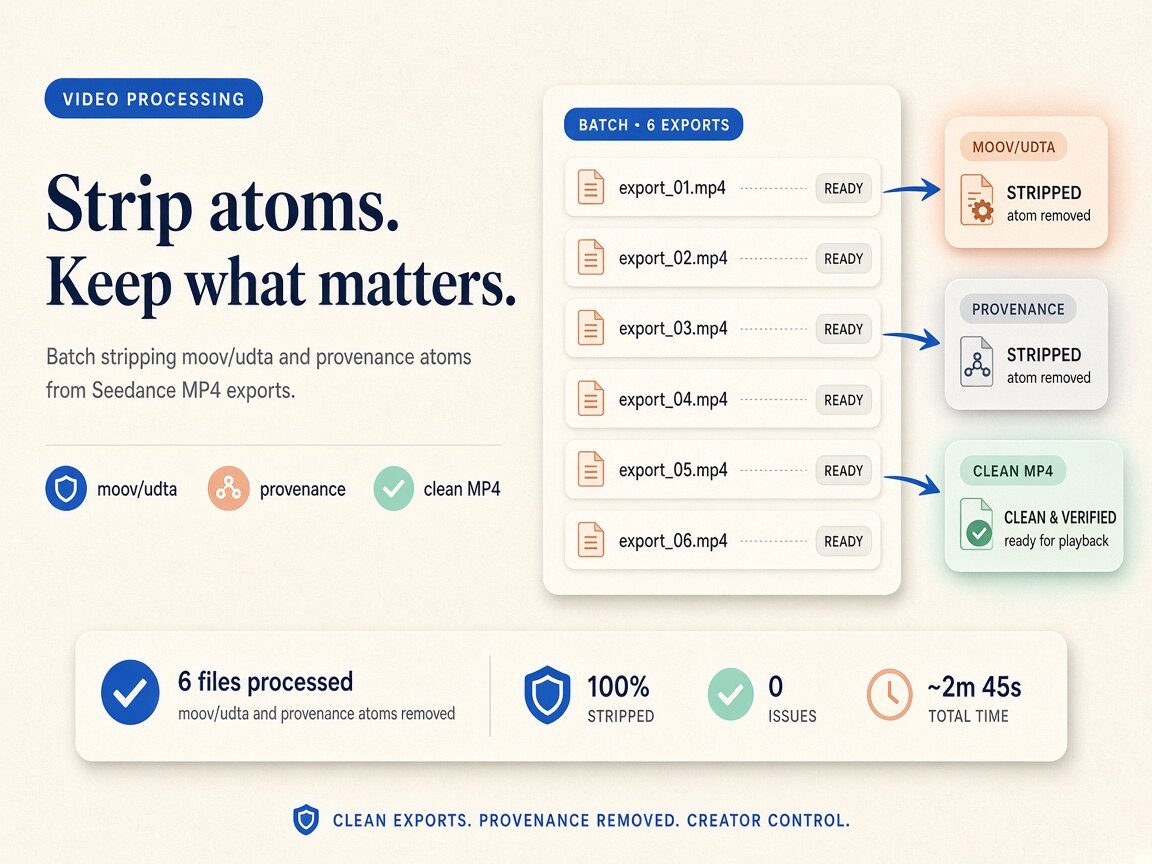
Strip video metadata in your browser
Files never leave your device. MP4 / WebM / MOV · local ffmpeg.wasm · up to 3 files, 100 MB each. First run downloads the WASM engine (~30 MB) to your browser only.
or drag and drop here
What
What our seedance video metadata workspace strips from your files
When you run seedance video metadata through this on-device utility, the browser parses ISO-BMFF and Matroska container headers across multi-shot narrative MP4, MOV, and WebM clips exported from Dreamina, Jimeng AI, CapCut commercial pipelines, and ByteDance Volcano Engine APIs. Specifically, our engine targets ByteDance Dreamina and Volcano Engine MP4/MOV moov/udta generator strings, C2PA JUMBF uuid manifests, XMP DocumentID tracking packets, and creation timestamps. Filmmakers, editors, and studio teams rely on a dedicated seedance video metadata workflow so published cuts carry crisp frames and synchronized audio without leaking internal prompt workflows, task UUIDs, or software trails. Because every step of seedance video metadata executes inside local browser memory via lossless stream copy, unreleased creative footage never touches a remote cloud bucket.
- Strip C2PA JUMBF uuid superboxes and provenance manifests with seedance video metadata in one local pass
- Clear MP4 and MOV moov/udta/meta dictionaries and encoder strings via seedance video metadata
- Remove XMP packets, workflow JSON comments, and mvhd creation timestamps using seedance video metadata
- Lossless `ffmpeg.wasm -map_metadata -1 -c copy` remuxing for seedance video metadata with zero frame re-encoding
- Process up to 3 clips per batch (100 MB per file) in the free seedance video metadata browser queue
- Honest boundaries: seedance video metadata clears container headers locally; it never alters pixel/audio SynthID
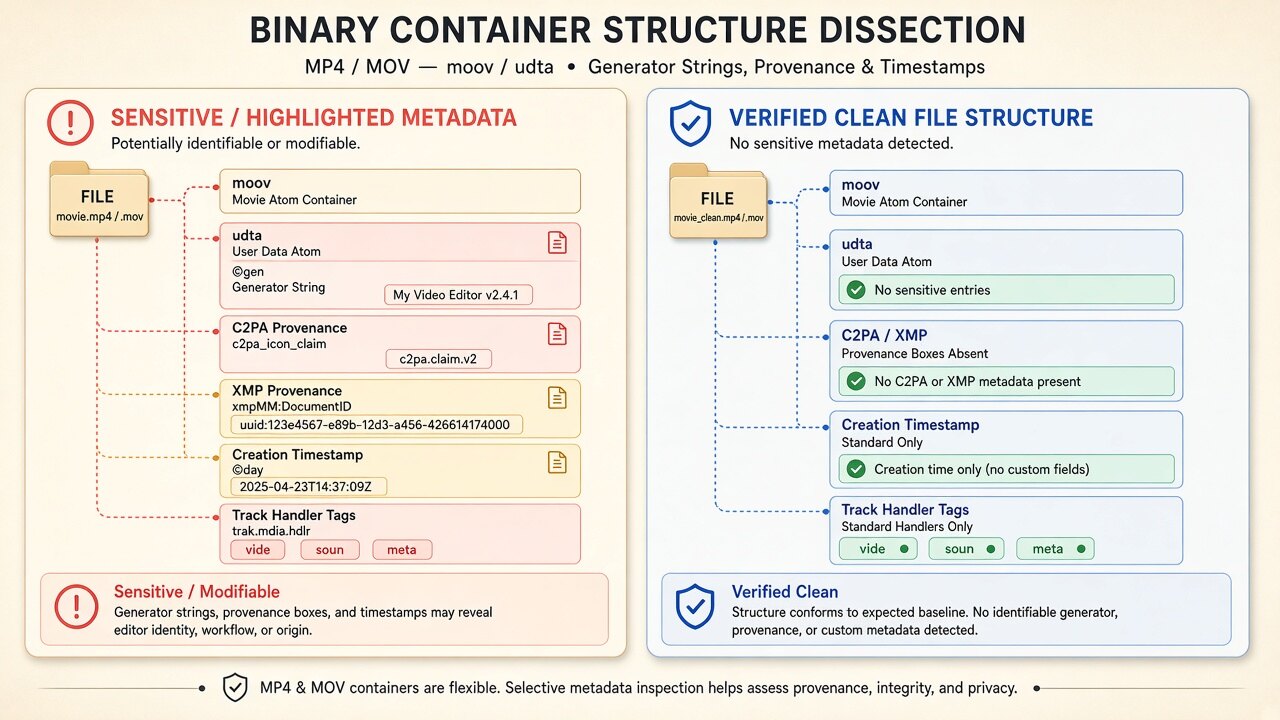
Binary container deep dive
Inside the MP4, MOV & WebM atoms targeted by seedance video metadata
Exports from ByteDance's Seedance 2.0 and Dreamina studios embed structured provenance identifiers in `moov/udta`, XMP `xmpMM:DocumentID` UUIDs, and C2PA JUMBF boxes to track cloud generation tasks. When preparing e-commerce ads or short-drama episodes for external delivery, our local WebAssembly remuxer strips those container boxes in browser RAM without touching the compressed H.264/HEVC keyframes. When you audit seedance video metadata in our read-only inspector or run the cleaning queue, the local demuxer strips top-level `uuid`, `meta`, `udta`, and XMP boxes while copying `trak/mdia/minf/stbl` sample tables directly into a fresh container. Using seedance video metadata locally ensures that neither global movie headers nor track-level handler strings survive in your distributed copies, while keeping your archival master files untouched on disk.
- Inspect and strip ISO-BMFF `uuid` C2PA JUMBF boxes during seedance video metadata cleanup
- Eliminate `moov/udta/meta/ilst` generator tags and workflow JSON blobs with seedance video metadata
- Normalize `mvhd` and `tkhd` creation timestamps and muxer strings via seedance video metadata
- Verify zero remaining container markers in Detect mode after running seedance video metadata
Lossless remuxing & studio workflow
Why `-map_metadata -1 -c copy` matters for seedance video metadata
Many online converters re-encode your clip through a lossy cloud transcode just to drop header tags, introducing macroblocking, color-space shifts, and audio drift. Our seedance video metadata workspace runs a true stream-copy remux (`-map_metadata -1 -c copy`) inside browser WebAssembly so every compressed keyframe, motion vector, and audio packet is copied verbatim. Production houses and social creators keep original master renders archived offline for provenance records, then run seedance video metadata right before publishing clean delivery files to client portals or social feeds.
- Zero generation loss: seedance video metadata copies H.264, HEVC, VP9, AV1, and AAC streams bit-for-bit
- Archive untouched master clips offline before processing seedance video metadata for public release
- Batch-clean up to 3 clips (100 MB each) per pass inside the seedance video metadata workspace
- Run seedance video metadata directly in desktop or mobile browsers after a one-time ~30 MB WASM load
Why
Why handle seedance video metadata locally in your browser instead of cloud uploaders

Zero server uploads for seedance video metadata
Cloud strippers force you to upload hundreds of megabytes of private footage to remote servers. Our seedance video metadata pipeline runs 100% inside local browser RAM so unreleased cuts never leave your hardware.
Deep MP4 & MOV atom hygiene with seedance video metadata
Desktop OS property windows ignore C2PA `uuid` boxes, `moov/udta` JSON comments, and XMP tracks. Running seedance video metadata here remuxes a clean container structure free of hidden generator dictionaries.
Honest technical scope on seedance video metadata
We clearly separate container-level atom stripping from pixel or audio watermarking. Using seedance video metadata removes header manifests and tags locally, while never making false claims about SynthID or platform policies.
Lossless stream copy for seedance video metadata
Drop up to three MP4, MOV, or WebM clips (up to 100 MB each) into the queue to execute seedance video metadata in seconds with zero re-compression.
How
How to use this seedance video metadata workspace in four steps
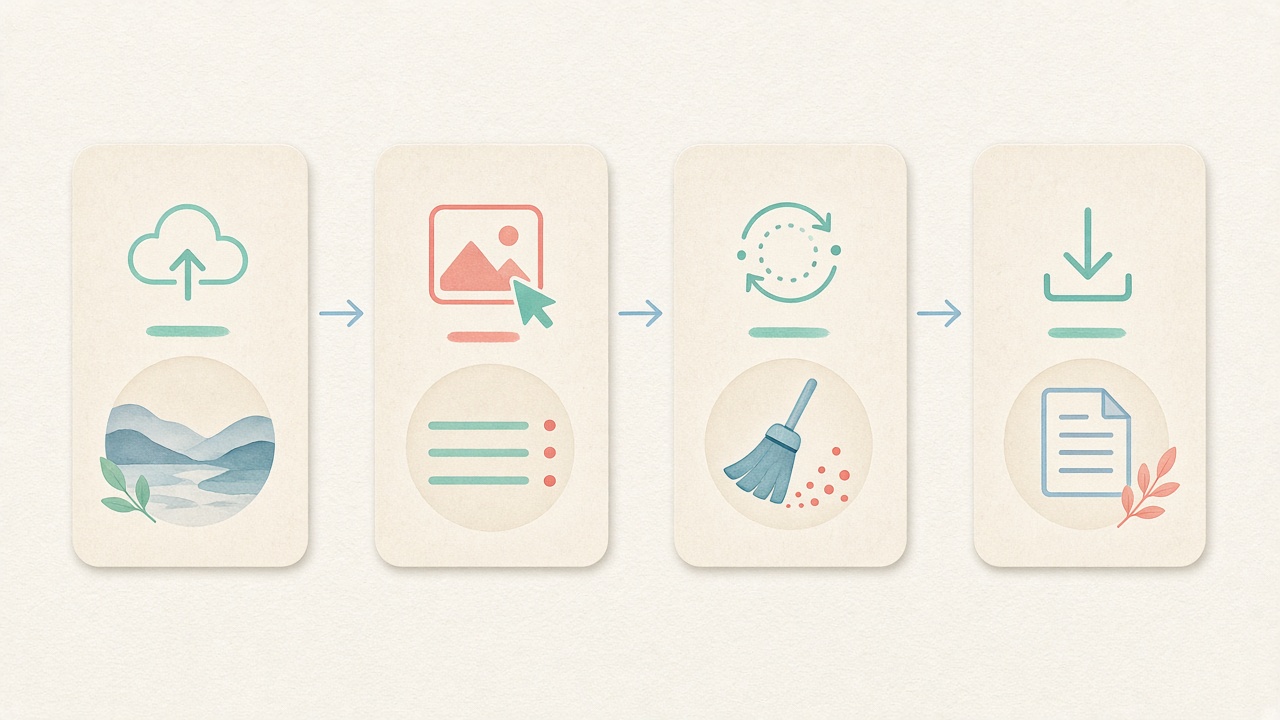
- Step 1
Open the embedded seedance video metadata tool
Stay right on this page—the local seedance video metadata workspace is pre-selected on the Video tab below the hero section with no signup or paywall.
- Step 2
Load the local WASM engine for seedance video metadata
On first run, your browser caches the ~30 MB `ffmpeg.wasm` module locally so every subsequent seedance video metadata pass starts immediately in memory.
- Step 3
Drop clips to inspect seedance video metadata
Drag up to three MP4, MOV, or WebM files (≤100 MB each) into the queue to review container tags before cleaning seedance video metadata.
- Step 4
Remux seedance video metadata and save clean clips
Click Clean to strip seedance video metadata via lossless stream copy in browser memory, verify the byte reduction, and save your clean derivatives.
Use cases
Who relies on our seedance video metadata workflow

Commercial post-production & VFX editors
Editors cutting shots from ByteDance Seedance 2.0, 2.0 Fast, and 1.5 Pro into client timelines use seedance video metadata cleanup before exporting review cuts to external stakeholders.

Performance marketing & ad agencies
Media buyers strip container bloat and task identifiers with seedance video metadata so social ad variations ship with clean, standardized MP4 wrappers.

Short-form & social creators
Creators publishing across YouTube Shorts, TikTok, Instagram Reels, and X run seedance video metadata locally to clear header manifests and timestamps before posting.

Technical directors & ComfyUI workflow builders
Specialists who build custom node graphs and multi-shot prompts use seedance video metadata to strip `moov/udta` comment blobs so shared clips do not leak proprietary parameters.

Indie filmmakers & animation studios
Studios standardize incoming pre-vis and concept renders with seedance video metadata to maintain uniform container hygiene across multi-artist pipelines.

Privacy-conscious everyday users
Anyone sharing personal clips on community Discord servers or group chats can clear seedance video metadata in seconds without uploading heavy files to the cloud.
Voices
What people say
Illustrative examples for layout — not verified customer reviews. No star ratings.

Maya R.
Product photographer
“I needed GPS gone before client galleries. Local batch + ZIP is exactly what I wanted.”

Jordan K.
Etsy seller
“Phone photos had home coordinates. Cleaning in the browser means I never upload originals to a random site.”

Alex T.
Social designer
“Clear about C2PA containers vs SynthID. I use Detect first, then Clean — no surprise claims.”

Sam L.
Freelance editor
“Fingerprint protection on by default is nice for reverse-image risk; I turn it off when pixels must stay exact.”

Riley P.
Content creator
“Video and PDF in the same local tool means I am not juggling three upload sites for one launch.”

Casey M.
Marketplace ops
“Batch-cleaning GPS before listing photos is now a fixed checklist step. Free limits cover our small team.”
Related
Related guides & tools
- Open cleaner
Jump to the embedded workspace to process seedance video metadata locally.
- Clean metadata
Strip EXIF, GPS, C2PA containers locally.
- Detect markers
Inspect EXIF, GPS, and C2PA containers on-device.
- What is C2PA?
Content Credentials containers explained honestly.
- What is SynthID?
Why metadata tools cannot remove pixel watermarks.
- Instagram metadata
Privacy before you post.
Ready to clean seedance video metadata locally in your browser?
Use the embedded workspace above to inspect and strip seedance video metadata across MP4, MOV, and WebM clips (up to 3 files, 100 MB each) — free, lossless stream copy, zero server uploads.
FAQ
Frequently Asked Questions About Seedance Video Metadata
- Can I process seedance video metadata without uploading my clips to a remote server?
- Yes, every step of our seedance video metadata workflow runs locally inside your web browser once the page and the WebAssembly module finish loading. We execute `ffmpeg.wasm` directly in device memory so your MP4, MOV, and WebM files are never transmitted across the network. This zero-upload design makes seedance video metadata ideal for confidential client spots, pre-release film shots, and private creative projects.
- Which specific MP4, MOV, and WebM container atoms does seedance video metadata remove?
- Our seedance video metadata engine strips top-level C2PA JUMBF `uuid` superboxes, QuickTime and ISO-BMFF `moov/udta/meta` tag dictionaries, XMP provenance packets, workflow JSON comments, `Lavf` encoder strings, and `mvhd`/`tkhd` creation timestamps. When you clean exports from ByteDance Seedance 2.0, 2.0 Fast, and 1.5 Pro, all non-essential header directories are omitted during the container remux. You can also switch to Detect mode first to inspect readable container fields before running your seedance video metadata pass.
- Does running seedance video metadata re-encode my clip or degrade visual and audio quality?
- No, visual clarity, frame rate, color grading, and audio sync remain 100% identical when you process seedance video metadata in your browser. Under the hood, the tool executes a lossless stream copy (`-map_metadata -1 -c copy`) that demuxes and remuxes the container without decoding or re-compressing the underlying H.264, HEVC, VP9, AV1, or AAC streams. Because seedance video metadata only rewrites the outer container headers, processing finishes in seconds with zero generation loss.
- Will this seedance video metadata tool remove Google SynthID or visible corner watermarks?
- No, and we state this technical boundary clearly: seedance video metadata only strips file-level container headers such as C2PA `uuid` manifests, `moov/udta` atoms, and XMP packets. Imperceptible pixel or audio watermarks like Google SynthID—as well as visible burned-in corner logos—are baked directly into the compressed frame pixels and audio samples, where no container remuxer can erase them. Furthermore, clearing seedance video metadata does not guarantee how third-party social platforms classify or label uploaded media.
- What are the file size and batch limits for the free seedance video metadata workspace?
- You can drop up to three MP4, MOV, or WebM clips into the free seedance video metadata queue at one time, with each file supporting up to 100 MB in size. On your very first run, your browser downloads the ~30 MB `ffmpeg.wasm` engine once and caches it locally for fast repeat sessions. If you have a larger folder of studio renders, you can run additional three-clip seedance video metadata batches back to back with no account wall.
- How can I verify that C2PA boxes and udta tags are gone after running seedance video metadata?
- After you finish seedance video metadata and save your cleaned MP4, MOV, or WebM derivative to disk, click the Detect link in the navigation bar and drop the exported file into the read-only inspector. The local scanner re-parses the binary container structure and confirms that C2PA JUMBF boxes, XMP packets, `udta` generator strings, and creation timestamps are absent. This gives you immediate, verifiable proof that your seedance video metadata cleanup succeeded before sending cuts to clients.
- Why do exports from ByteDance Seedance 2.0, 2.0 Fast, and 1.5 Pro contain hidden container metadata in the first place?
- Generative studios and local node frameworks embed C2PA Content Credentials, XMP `DocumentID` strings, and `moov/udta` parameter blocks to track cloud render tasks, document origin, or store reproducible ComfyUI workflows. While helpful for internal studio archiving, those binary boxes also expose prompt engineering recipes, account UUIDs, and exact creation clocks when clips are distributed publicly. Running a local seedance video metadata pass lets you keep original master files archived offline while sharing clean delivery copies.
- Does this seedance video metadata cleaner work on macOS, Windows, Linux, and mobile browsers?
- Yes, the seedance video metadata workspace runs inside any modern desktop or mobile browser that supports WebAssembly, including Chrome, Safari, Edge, Brave, and Firefox. Because all container remuxing happens in local browser memory, you never need to install command-line FFmpeg, Python scripts, or ExifTool on your workstation to handle seedance video metadata safely.
Privacy utility for files you hold locally. Running seedance video metadata strips container-level MP4/MOV/WebM atoms and C2PA/XMP/udta markers via local ffmpeg.wasm; it does not remove SynthID or pixel/audio watermarks, does not perform cryptographic C2PA validation, and never guarantees platform labeling outcomes.